
Does Technology Aid Firms To Deal With Market Volatility? Read On!

Technology Aid Firms

The biggest challenge for the business is failing to predict the future problem. No one can envisage the exact problem, and it becomes worse when the issues suddenly appear. For example, people were not able to predict the novel corona virus outbreak.

No doubt, it affects the business severely and turns them to face terrible losses. Such incidents are considered as volatility or market sudden changes. Though, we cannot run from a dire situation, because these are the part of the business.

Now, the question arises that how you can beat the market volatility? To manage the issues, technology can help you. You might be wondering that how tech can help you, then to get the answer read this blog.

Technology Role to Solve the Problem of Volatility

Impulsiveness will remain for a more extended period, but technology and human together change it.

For example, 

Suppose you met with the funding problem and running a small business. In this scenario, getting funding from investor becomes an arduous work.

How technology provides a solution: Nowadays, getting money becomes comfortable with FinTech. You can quickly get the money with options, like a quick loan in the UK. Here, you do not have visit anywhere, just contact to the fund provider, and get fast money.

Similarly, you are getting a quick solution with the aid of technology. Now, let’s dig deep and understand how it changes the working principle.

Top Technology That Facilitates To Run The Business 

We have covered the top tech product that can change your life, and prepare you to beat any competition.

  1. Cloud computing Mobile working and telecommuting  
  1. Raise the online presence with social media 
  1. Share digital files 
  1. Time tracking software 
  1. Augmented reality 

Let’s grab them in details.

Cloud Computing 

In earlier days, managing data was a bit hassling task. But with cloud computing, everything becomes so simple and easily accessible. If we go through the technical definition, then read below.

Cloud computing generally considers the practice of different network server that is manageable from the various sites. In this, you have to remove the working principle of the local servers and personal computer. It includes three parts:

  1. Storage of data
  1. Managing the information
  1. Process the received data

These are the three crucial part of cloud computing. And, this shows how technology dominates the field of saving data.

Mobile Working and Telecommuting 

No one knows what will happen tomorrow, so for safety, mobile working and telecommuting play an imperative role. In this, you can access the work from anywhere, and manage the task without any problem.

There is numerous remote desktop applications available that can aid you to perform the work. Even with this technology, you can run the paperless work. You have to complete the task and sending the work to the particular network. Even the virtual phone number is present that you can take anywhere.

The best part is that you can operate such application with your mobile. Now, you can imagine how technology helps to in every aspect.

Raise The Online Presence With Social Media 

In older time, it was hard to predict the market volatility, but these days with the aid of social media, you can envisage them. Here, you may receive the hints that you have to collect that may lead you to guess the next problem.

These days, the market is quite open, and it is visible to everyone. All you need a sharp eye, now if something happens, then check that does it influence in your business? If you get the answer Yes, then ready for it. With social media, it becomes possible.

Share Digital Files 

We have discussed those incidents like corona outbreak that put human to lockdown. It is possible to share a physical file when you are in office, but a digital file helps you to share it no matter where you are present. Even this is applicable when you are in office place because it reduces numerous additional cost.

Time Tracking Software 

It is the excellent software that will direct you to check where one is spending the time most. Generally, such software is used to monitor the employee’s activity. It is beneficial for both the business and the worker’s growth.

However, the main objective behind obtaining such technology is to check the following things:

  1. Accountability
  1. Process improvement
  1. Productivity

Isn’t it amazing that you can watch the activity of your employees?

Augmented Reality 

AR has changed everything and bring revolutionary changes in the business sector. With this technology, you can provide the clients with demos of your ideas. It will help them to understand the project in a much better way.

These are the parts of the technology that can help you to beat the market volatility. If you will able to utilise it properly, then no matter what is the current situation of the market, your life will not get affected. In this way, tech can support you to beat the terrible situation.


Ways to Clean Windows Registry to Speed Up Your PC Performance

Speed Up Your PC Performance

Do you want to clean up the Windows registry but don’t know where to start? Do you want to speed up the performance of your PC in a safe manner? 

If your answer to these above questions is a big ‘YES’ then this article will guide you with some ways to do so. We have carefully crafted some easy to follow ways so that you can clean up the system registry without invoking any other issues on your system.

Before we discuss the methods, let us first know what a registry is and how it works.

Understanding the System Registry in Brief

Windows registry is a database of information, low-level settings, configuration files, options and low-level software/hardware values. A subkey is automatically generated whenever a user tried to perform either of the following functions:

  • Create a new file.
  • Delete any item.
  • Rename a folder/file.
  • Install a program/application/utility.
  • Copy a file to another location in the system.
  • Move a particular item in the system.

This subkey is allotted to these functions and the more a user performs different functions on the computer, the more these subkeys get generated. This is how the database keeps increasing.

Windows registry is something one should not mess with as one mishandled tweak might result in a system crash. Thankfully there are some methods by which you can easily and safely remove these unwanted files and logs of subkeys.

Methods to clean up the registry on Windows 10:

Let us discuss the useful methods to safely clean up the registry on your Windows 10 computer:

1. Deploy a Registry Cleaner Application:

If you want to have an automatic way to check for the useless registry files and remove them to restore system storage then you need to have a Windows 10 registry cleaner. 

These types of applications run on complex algorithms that help the system detect the following:

  • Corrupted subkeys.
  • Invalid keys.
  • Invalid registry entries.
  • Registry errors.

These applications also remove the useless registry files and logs from the computer, giving it a performance boost.

2. Backup Your Registry: 

The very first step is to perform a backup of the entire Windows registry. Performing a backup involves a few steps mentioned below:

  1. Click on the Windows button.
  2. Select the ‘Run’ utility.
  3. In the Run box, type in ‘Regedit’.
  4. Click on ‘OK’.
  5. Hit Enter.
  6. Open the Registry Editor Window.
  7. Right-click on the Computer icon.
  8. Select Export.
  9. Give the backup a name. 
  10. Save it in an external hard disk.

3. Create a System Restore Point:

You must also create a system restore point so you can roll back to the point where the system registry was fine. Take the steps that follow:

  1. Click on the Windows button.
  2. Click on the ‘Control Panel’ utility.
  3. Select ‘System and Security’ and open it.
  4. Click on ‘System’.
  5. Look for the ‘Advanced System Settings’ on the left side.
  6. Click on the ‘Advanced System Settings’.
  7. Click on the ‘System Protection’ tab.
  8. Select ‘Create’.
  9. Press ‘OK’.

4. Restore Your Registry Carefully from the Restore Point:

Use the restore point to restore the registry. You can restore the backup using the restore point. Go through the steps that follow:

  1. Click on the Windows button.
  2. Click on the ‘Run’ utility.
  3. Type in ‘Regedit’.
  4. Hit Enter.
  5. In the Registry Editor, click on the File tab and then select the ‘Import’ function.
  6. In the Registry Import file pull-down menu, select the saved point you created.
  7. Click on that save point and click on ‘Open’.

5. Use the SFC Utility to Scan Your Registry:

You can use the SFC utility to scan your registry. The System File Checker is a built-in tool that checks for the authenticity of files, registry items and logs. 

Following are some steps:

  1. Launch the ‘Command Prompt’. 
  2. Run the Command Prompt as administrator.
  3. In the Command Prompt window, type in the command: sfc /scannow.

Final Words:

So that’s it, users. These are ways to clean up the Windows Registry and improve the system performance a bit. It is highly advisable to install a registry cleaner that tackles the registry issues safely and quickly.

There are several ways to clean the registry on a Windows 10 computer. We have compiled a small list of steps and methods and tried to keep things simple to understand for every user. 

Although, registry cleaning does not restore that much system storage. But a cleaning app might work best on an older system.

What are vehicle telematics devices and vehicle tracking

vehicle telematics devices

Like clockwork, another technology gives the idea that changes perpetually the manner in which individuals convey and work with one another. Global positioning system vehicle tracking produced from the development of the computer, cell phones, and the Internet. These all joined to frame another technology; Vehicle Telematics. The more broad subject of Telematics can cover numerous regions. The focal point of this article is vehicle telematics devices, which can be characterized. The utilization of PCs and media communications to upgrade the usefulness, profitability, and security of the two vehicles and drivers.

Various vehicle telematics devices plans

An observable bit of various vehicle telematics devices plans is vehicle following. Normal vehicle tracking system involves two center parts; area equipment (otherwise called Vehicle Location Unit or GPS beacon) and vehicle tracking programming. The GPS beacon is frequently designed in the vehicle. For a first-hand forward vehicle tracking item, the establishment menas fitting the gadget utilizing a straightforward three-wire association; start switch, battery, and earth. GPS guides using SIRF II or comparative GPS beneficiary technology require the utilization of a radio wire, outer to the gadget. Fitted in the view of the sky to get ideal GPS transmissions. A resulting gathering contraption is used to transmit the information off-board the device, typically using a flexible data like GPRS.

Most recent age GPS beneficiaries may imply that the establishment foregoes the utilization of an outer GPS receiving wire. As expressed, the run of the following equipment for an armada the board arrangement utilizes GPS to pinpoint the area. Updates are transmitted at a customarily arranged interval, or after and including an event trigger, for instance, start on/off. This region/adventure information is usually made accessible to the client by the specialist co-op, by means of a site. Where a protected login empowers armada movement to be seen live by largely, using electronic mapping and reporting devices. 

Vehicle tracking system design

Vehicle tracking systems are frequently designed to transmit area and information at a set update rate or when an occasion triggers the unit to transmit information. Passage level “Live (or ongoing) vehicle tracking” for the most part alludes to frameworks which are designed just to refresh at standard planned interims; 1 moment, 2 moments or 5 moments and so forth. These short update interims are utilized while the start status is on and once the vehicle is left, start off. The gadget will regularly go into hibernation or backup mode, transmitting refreshes discontinuously or upon wake up by the following start on. The contribution from a movement sensor joined to the gadget. 

Numerous Telematics Service Providers, confronting expanded rivalry and falling costs, are quick to show that Telematics can mean something other than vehicle tracking. The appearance of joined two way informing and satellite route items is such a case of this item advancement. Armada supervisors can decide to accomplish more than basically find a vehicle or gathering of vehicles. Supposed Connected Navigation arrangements, permit armada directors and employment dispatchers to find and track a vehicle or gathering of vehicles corresponding to client destinations. At that point transmit and get work messages to and from drivers. While the locally available route gadget naturally makes an excursion course. And sends the evaluated time of appearance back to the activity dispatch office. This can prompt more employments finished every day, decreased excursion times, fuel investment funds and improved consumer loyalty. 

Feature of vehicle telematics devices

At the point when utilized in a business domain vehicle telematics devices can be an amazing and important instrument to improve the effectiveness of an association. The action can be examined and choices are taken dependent on genuine data, not a mystery. Key Performance Indicators including, venture times, efficiency and driver hours, can be improved. 

The test is finding the correct following and telematics arrangement and afterward utilizing the data it gives to guarantee the most extreme advantage is returned against the venture. 

Different terms utilized according to vehicle telematics devices may likewise incorporate, GPS vehicle tracking, GPS following, GPS tracker, telematics and satellite following or satellite tracker.

As vehicle telematics devices technology has created and its utilization turns out to be progressively boundless. Consistently expanding the number and an assortment of vehicle tracking frameworks are accessible to independent venture clients. 

Understanding the technology behind these items, comprehending what benefits this technology can convey. While simultaneously, monitoring a portion of the potential traps to maintain a strategic distance from. It will set aside the potential client cash and ultimately help the execution of these arrangements. 

Vehicle tracking 

Vehicle tracking is the technology of following the developments and additionally status of a vehicle using a vehicle tracking gadget. It regularly outfitted with a GPS Locator what’s more, GPRS modem, which is well fit in the vehicle. Following programming is then used to see the data, open as a PC or Web-based mapping and revealing application. 

Trailer Tracking 

Trailer tracking is the technology of following the developments and position of an explained vehicle’s trailer unit. Utilizing a territory unit fitted to the trailer and a strategy for restoring the position information by means of portable correspondence. Arrange or geostationary satellite exchanges, for use anyway either PC or Web-based software. 

Fuel Saving Telematics 

The common vehicle, business vehicle or heavy goods vehicle functioned starting late. By and by comes outfitted as standard with onboard engine diagnostics. This information can be gotten through auxiliary selling items which catch information straightforwardly from the vehicles’ exchanges sort out. These exchanges compose (CANbus) passes data around the vehicle interfacing all the components of the vehicle; engine execution, fuel use, diagnostics, etc. Extraordinary components of which can be caught and afterward transmitted off-board the vehicle to be examined by the client.

Having the option to show the driver that they are over firing up, not utilizing voyage control enough, heading to quick, not being proficient in their utilization of apparatuses and so forth., can prompt improved efficiency and decreased vehicle discharges. Notwithstanding driving execution checking, suppliers are starting to offer ECU remapping to advance the presentation of the vehicle. At the point when joined with capacity to screen vehicle execution and driver conduct, ECU remapping is elevated as prompting mileage reserve funds of up to 10%. 

GPS Satellite Navigation 

GPS Satellite Navigation technology utilizes a GPS and electronic mapping apparatus to empower the client to find a position, at that point course design and explore an excursion. 

Mobile Portable Data 

The utilization of remote information correspondences utilizing radio waves to send and get ongoing PC information to, from and between gadgets utilized by field based work force. 

Vehicle tracking are presently generally accessible from an immense number of providers; a significant number of whom advance themselves as the “showcase pioneer” and guarantee to convey ‘money saving advantage’ and ‘quantifiable profit’. With broad experience of working with the two providers and clients “I feel that clients of vehicle telematics, in the event that they are really to see the advantages guaranteed by providers and producers, need and should be better educated.”

Convert Offline OST to Multiple File Formats

Microsoft Outlook Application is a feature-rich email application which provides numerous functionalities to fulfill the messaging needs of organizations. In the offline mode, it saves all the Exchange mailbox data in the OST file. In the absence of Exchange server connectivity, the user can easily access the mailbox data in the offline mode. But in some situations, the users want to convert offline OST file to Multiple file formats such as HTML / MSG / PDF / EML / PST.

Do you want to know why the user wants to migrate OST file to various file formats? well, there are many reasons. So in this article, we will discuss the reasons and also the solution to export Outlook OST file to multiple file formats. To perform the conversion process we will take the help of one of the renowned SysTools OST Converter software. Before proceeding to perform the OST file conversion process, let us explore the reason first.

Reasons to Convert Offline OST file to Multiple File Formats 

There are several reasons to export the OST file data to various other file formats, some of which are discussed below.

  1. Data Migration: In case if you want to migrate the data from one place to another place like if your organization is shifting the data. Also, you want to move the OST file to another system. So, in that case, the user can perform the OST file conversion process.

2. Mailbox Corruption issue: Like any other files, this OST file can be corrupted due to various reasons such as Virus infection, software malfunctions, hard disk failure, storage media failure. So, In that case, the user can save the OST file data such as Outlook PST or any other required file format.

3. Exchange Server Crash: In case of Exchange server crash and you have an OST file so in that case, the user can save the data In Outlook compatible PST file format.

Convert offline OST file to Multiple File Formats By Using OST Converter Tool 

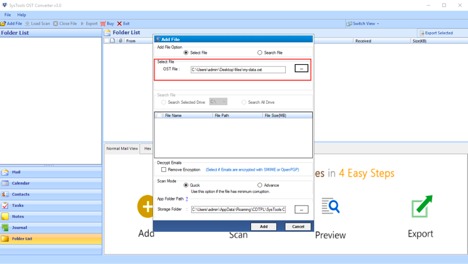
To export the OST file data the user can take the help of the SysTools OST Converter Application. This software allows the user to perform the OST file conversion process in multiple file formats. Let us explore the features of this application. This software provides you two scanning modes which are Quick Scan and Advanced Scan. In case if your file is severely corrupted then the user can choose the Advanced scan mode. 

The user can also perform the encrypted OST file conversion process.  Also, the user can select the single as well as the multiple OST files for the conversion. OST file converter application comes with the easy to use and simple graphical user interface so that everyone can easily use this application.

Let us have a Quick Glance at the Feature of this OST Converter Application

  1. Convert OST to 5 Different file formats such as HTML / PDF / MSG/ PST / EML .
  2. Migrate OST File emails, contacts, calendar, etc
  3. Export IMAP/ Exchange / Office 365 /Hotmail OST files to PST.
  4. Export corrupted/orphaned OST files easily.
  5. The tool is compatible with the Latest Version of Windows and Outlook.
  6. Remove and Decrypt S/MIME and OpenPGP encryption from OST files.

Follow the Steps To Export OST file to Different File formats. 

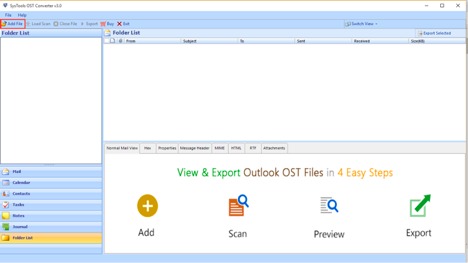
  1. Install and Run the Software on your system and click on the Add file.
Install and Run the Software

2. Browse the OST file and choose the Scan Mode.

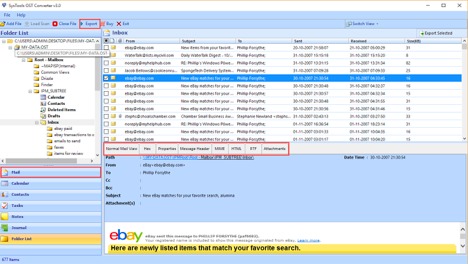
3. Now Preview Outlook OST file emails, contacts, calendar.

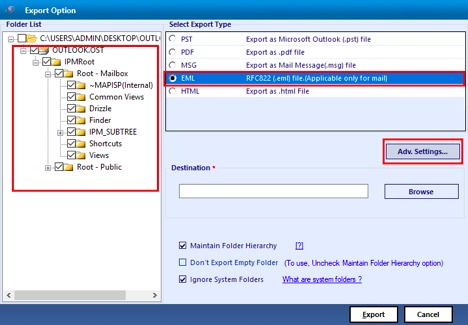
4. Click on the Export button and select the desired file formats to save data.

Conclusion 

There are many reasons due to which the Outlook users want to convert offline OST file to Multiple File formats. So in this article, we have discussed the solution with the help of the OST Converter Application. So to migrate the Outlook OST file items to other formats the user can take the benefit of this software. Also, this application is compatible with Outlook 2019 / 2016 / 2013 /2010 and all versions of the Windows Operating System.

5 Smartest Tools To Embed A YouTube Widget On Your Website

Tools To Embed YouTube Widget

We all know Youtube is the second largest search engine as well as one of the most popular media platforms around the world. People post and share videos on Youtube, you can find videos on almost all topics there. This opens a lot of doors for businesses to leverage the visual-based theme and the power of the large user-base Youtube possesses. 

Humans are visual learners. They prefer to look at visuals rather than text and what better visual platform that Youtube. Youtube works with not only visuals but videos which are the greatest media to catch one’s attention and retain it for longer. 

Leveraging videos for your business can be a great strategy to attain your expected target. But how? 

YOUTUBE WIDGET is the answer!

You can embed a Youtube Widget on your website and see how it works for you. 

Let’s know more about it.

What is a Youtube Widget?

A Widget is a display that lets us interact with any other application on a website. Therefore, Youtube Widget displays for us the Youtube application so that we can interact with Youtube videos directly from the website. 

A Youtube Widget can help a lot with various factors such as increasing website visitor’s dwell time as videos can retain attention for longer eventually decreasing the bounce rate. It will help you build trust among your users by showing them your videos. Videos also help in driving conversions and improving the conversion rate.

5 Tools to Embed a Youtube Widget on Website

Here are the 5 smartest tools that can help you embed a YouTube Widget on your website for a better website look and attracting users through videos:

  1. Taggbox Widget
Taggbox Widget

“Taggbox is a UGC Platform that helps marketers increase user-engagement, build trust, and drive conversions with solutions to discover, curate, and display user-generated content on all the marketing touchpoints.”

It provides you a solution Taggbox-Widget that helps you embed widgets on your website. You can embed content from various social media platforms. So, easily embed your Youtube Widget with the help of this tool through your Channel URL, Playlists, Keywords, as well as Location. 

It provides you with some amazing features as well:

  • Real-time updates that display instant updates from Youtube to the widget.
  • Personalization feature lets you customize your widget with Taggbox’s plethora of themes, fonts, styles, and colors. 
  • The moderation feature lets you filter out the unwanted and irrelevant content for your widget.
  • Analytics feature helps you study the performance reports of your widget.
  • And many more

2 TwineSocial

Twin Social

TwineSocial is also a platform that helps you utilize UGC for your marketing through different solutions. It lets you collect, curate, brand, and then publish the widget on your website. It is a reliable and fast platform to display UGC on your website. It has great security protocols and smart workflows that will help you with your widget management. 

3. Embed

Embed

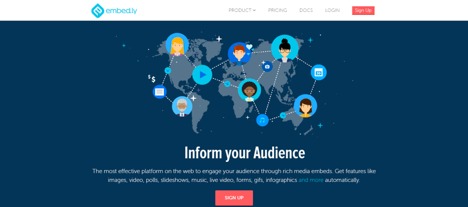
Embed.ly is a very good platform that helps you embed your Youtube Widget on your business website. You can embed your Youtube Widget through this tool without much effort as it is so easy to use. It helps you embed content from many other social media platforms as well.

4. YT Channel Embed

youtube

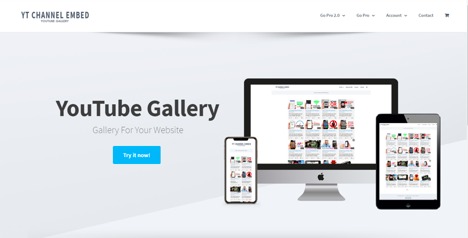
YT Channel Embed is a tool that helps you create your Youtube Video Gallery on your website. It has a responsive display that can fit in any sized screen. You can customize your widget with various options provided by the tool. It helps you directly play Youtube videos on your own website and make it more interesting. 

5. WordPress Plugin

wordpress

It’s an all-inclusive plugin that helps you with integrating your Youtube account with your website. This gives you access to all the extra buttons and search widgets. It also lets you match the theme of the feed to your webpage. 

You can easily embed your Youtube Channel on your website, which will simplify sharing videos directly through your website. It can also help you to convert your website traffic to your Youtube subscribers. You also have a feature to be able to track your website visits through Youtube advertising.

Conclusion

There is a reason people use visuals more than text now, the audience enjoys visual content more than textual content. Embedding your Youtube Widget is a step towards that. 

Embedding your Youtube Widget works for things other than user engagement also. It will help you to decrease the bounce rate and increase the dwell time of the users.